Table of Contents
How to Access Object Storage with Rabata
Rabata makes accessing Object Storage straightforward and flexible. Whether you prefer a slick web interface, the power of command lines, or coding with APIs, we've got you covered to match your style and the task at hand.
Console Access: Your Browser’s New Best Friend
If you love clicking through a clean, browser-based dashboard, the Rabata Console is your go-to. Just fire up a supported browser, navigate to the Infrastructure Console sign-in page-accessed conveniently from the top menu-and enter your cloud tenant, username, and password. Simple as that, and you’re in.
Keep in mind, Rabata works best with the latest versions of popular browsers. We like to keep things fresh and compatible, so make sure your browser stays within the last three major updates for the smoothest sailing.
| Browser | Supported Versions | Notes |
| Microsoft Edge | Latest three major versions only | None |
| Firefox | Latest three major versions only | Private Browsing mode isn't supported |
| Google Chrome | Latest three major versions only | None |
| Safari | Latest three major versions only | None |
Command Line Interface: Fast, Flexible, Functional
For those who like to keep their hands on the keyboard and avoid the mouse, Rabata’s Command Line Interface (CLI) lets you get things done quickly without writing a single line of code. If you want both speed and full feature access, the CLI is your trusty sidekick. It’s perfect for automation, scripting, and quick adjustments.
REST API: The Playground for Developers
If programming is your jam, then Rabata’s REST API is a treasure trove of functionality. It requires some coding chops but opens the door to full control over your object storage. Whether you’re building custom tools or integrating with other services, the API has what you need.
Rabata supports multiple APIs tailored to different needs:
- Object Storage Service - The core API for everything storage related.
- Amazon S3 Compatibility API - Perfect if you’re familiar with Amazon’s ecosystem and want seamless migration or integration.
- Swift API - Designed for Oracle RMAN users who want efficient backup solutions.
SDKs: Your Ready-Made Toolkit
Not keen on setting up frameworks from scratch? Rabata provides SDKs for various programming languages that handle the heavy lifting of interacting with object storage for you. Think of it as your personal assistant that speaks the language of your code and gets your storage tasks done without fuss. For details, see our guides on SDKs and CLI.
How does cloud object storage stack up against other storage types?
Cloud storage isn't just one-size-fits-all. It breaks down into three main types: object, file, and block storage. Each shines in its own arena, catering to specific needs and use cases. The secret lies in choosing the right type for the right job, and Rabata's secure cloud storage knows exactly how to handle that.
File storage
Many applications thrive on shared access to files. Traditionally, this role was filled by network-attached storage, better known as NAS. File storage speaks in protocols like Server Message Block (SMB) for Windows and Network File System (NFS) for Linux. It’s the go-to solution for unstructured data such as large content libraries, media vaults, home directories, and basically any scenario where files need to be stored and shared.
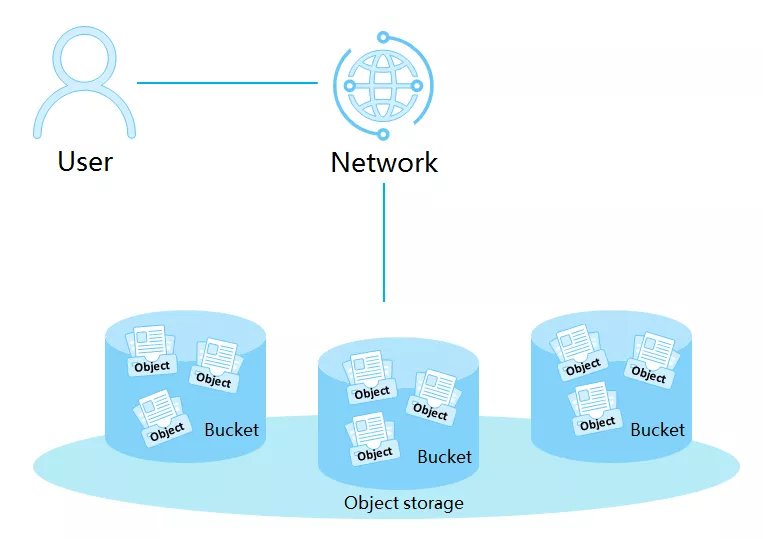
The main game-changer between file and object storage is how data is organized and how far it can grow. File storage is hierarchical, neatly arranged in directories and folders, like a well-organized closet. It also plays by strict protocol rules - SMB, NFS, or even Lustre if you’re fancy. In contrast, object storage tosses out the hierarchy and opts for a flat structure. Each object gets a unique ID and metadata, making it a breeze to hunt down exactly what you need, even when dealing with billions of files.
This difference in structure hugely impacts scaling. File storage can feel like pushing a boulder uphill when trying to expand beyond a certain size because the hierarchy introduces limits. Object storage, the type Rabata favors, laughs in the face of such limits, offering near limitless capacity - petabytes of data, billions of objects - all handled effortlessly.
Block storage
Some enterprise applications, like databases or ERP systems, demand storage that’s as fast and dedicated as a barista remembering your coffee order. Enter block storage. It’s like direct-attached storage (DAS) or storage area networks (SANs) but in the cloud, provisioning ultra-low-latency storage directly to your virtual servers. This means performance-critical workloads get the speed and reliability they need without hiccups.
While block storage excels in speed and precision, it’s best suited for structured data environments - think databases, virtual machine file systems, or any place where rapid read and write cycles dominate. Rabata’s secure cloud storage uses block storage where precision and performance take center stage.
On the flip side, object storage shines brightest when dealing with vast troves of unstructured data. It’s the heavyweight champion for durability, scaling without end, and advanced metadata management, ensuring your data is not just stored but smartly organized and endlessly accessible.
Why object storage matters for your business
As your business grows, so does your data - often in unpredictable ways. You end up juggling numerous isolated data pools, each coming from different sources, feeding a variety of applications and users. The catch? Most of that data is unstructured, scattered across different formats and storage media, refusing to fit neatly into a single, central repository.
This chaos creates headaches. It slows innovation to a crawl because your data isn’t easily accessible for analysis, machine learning, or building new cloud-native applications. That’s where Rabata’s object storage steps in. It breaks down those data silos, offering a massively scalable, cost-effective way to store any type of data exactly as it is. No need to reformat or wrestle with capacity limits.
Traditional storage systems struggle with complexity, limited capacity, and high costs. Rabata’s object storage throws those concerns out the window by delivering practically unlimited scalability at impressively low prices per gigabyte. Your data grows, your costs don’t spiral - sounds like a dream, but it’s real.
Managing your unstructured data becomes a breeze thanks to Rabata’s user-friendly interface. Apply smart policies to keep your storage costs optimized, automatically switching storage tiers when the time’s right. Instead of hunting through scattered folders, you get instant access to your data, making analysis smoother and insights quicker - so decisions happen faster and smarter.
Sure, you can keep objects on-premises if you want. But Rabata’s object storage is built for the cloud from the ground up, offering near-limitless scalability, rock-solid durability, and cost-effectiveness all in one package. Need to access your data on the fly, from anywhere in the world? No problem. With Rabata, your data is always within reach.
Extensions
These handy features are not part of the usual Path API lineup. Instead, they come as bonus tools supported by Rabata's secure cloud storage abstraction layer, giving you more power and control over your data.
bucket
Fetch the bucket name with ease. Think of it as asking Rabata: ‘Hey, which bucket am I dealing with?’ and getting a precise answer every time.
checksum
Want to verify your file’s integrity? This method returns the checksum, a handy fingerprint that shows if the file is exactly as expected-no surprises, no mysteries.
container
A neat little alias for bucket. If you prefer calling it a container, Rabata’s got your back - same thing, just a different name to keep everyone happy.
fs
Here’s a convenience feature: access an already instantiated filesystem without breaking a sweat. It’s like having your filesystem handed to you on a silver platter.
key
Need the object key? This retrieves the unique identifier for your stored file, making sure you always find exactly what you’re looking for in Rabata’s cloud maze.
namespace
This returns the namespace of the object, which usually looks like a protocol prefix - say, s3:// - paired with the bucket name. It’s Rabata’s way of labeling your data’s home and mailing address all in one.
path
Get the path compatible with fsspec, designed to work seamlessly with filesystem instances. Rabata makes sure your file locations speak the right language.
protocol
This reveals the filesystem_spec protocol in use. Knowing the protocol means you know how Rabata’s cloud storage is communicating - no secrets, just straightforward tech talk.
read_block
Grab a slice of your file by reading a block of bytes starting at a specific offset. Rabata ensures if you set a delimiter, the read boundaries respect it, so you don’t get half sentences or truncated data chunks messing with you.
If you start at zero, Rabata kicks off right from the beginning. Try to read past the end of the file? No problem - it just gracefully reads up to the EOF, keeping things smooth.
sign
Want to share a file temporarily? Rabata can generate a signed URL that acts like a VIP pass needing no permanent credentials, letting you delegate access securely and with a time limit.
size
Quickly fetch the size of your file in bytes. This lets you know exactly how much space your data is munching up in Rabata’s cloud.
storage_options
Customize how your filesystem instantiates by tweaking storage options. Rabata provides flexible settings so you can optimize storage behavior without fuss.
ukey
Need to detect if a file has changed? The ukey offers a hash of file properties, acting like a watchdog that alerts you when your file’s fingerprint no longer matches.
Storage classes tailored to your performance needs
With Rabata, you pay only for the data you actually store or send out of your buckets. No hidden fees or surprises - just straightforward, transparent pricing that lets you keep track and control of your costs.
Rabata’s cloud storage rides on a robust global infrastructure designed to flex with your workload. Whether you’re backing up photos, storing videos, or handling massive files for your business, Rabata offers multiple performance tiers that adapt to what you need. This means you get reliability and speed without overpaying for power when it’s not required.
Oh, and here’s a neat bonus - no extra info or hoops needed to download your data. Rabata keeps access smooth and hassle-free, so when you reach for your files, they’re right there, no questions asked.
Migrate to object storage
Moving your stash of local data to Rabata's object storage is a smart move. Whether you're looking to free up space or beef up your backup game, we've got you covered with clear guides for the usual suspects.
From job artifacts with those nostalgic archived logs to big bulky LFS objects, everything finds a snug home. You'll even find directions for the trickier bits like merge request diffs and project-level Secure Files.
And if you're feeling adventurous, dive into optional goodies like Packages and the Dependency Proxy. Don't forget the Terraform state files and Pages content - they deserve a spot in the cloud too.
- Job artifacts including archived job logs
- LFS objects
- Uploads
- Merge request diffs
- Packages (optional feature)
- Dependency Proxy
- Terraform state files
- Pages content
- Project-level Secure Files